
home_assistant:installatie
This is an old revision of the document!
Table of Contents
Installatie

context
dit document beschrijft de installatie van Home Assistant
Docker
- download de image:
docker pull homeassistant/home-assistant
- start de container:
docker run -d --name homeAssistant -p 8123:8123 homeassistant/home-assistant
- open een browser op http://<DockerHost>:8123
- doorloop de wizard: CREATE MY SMARTHOME
Debian
source: ChatGPT
Staging Debian VM
- Create a Debian VM on ESXi
- Give it
- 2–4 vCPU
- 4GB RAM (more if you plan many integrations).
- 20–30 GB disk is usually sufficient for Home Assistant OS installation inside Debian.
- Update Debian:
sudo apt update && sudo apt upgrade -y
sudo apt install -y software-properties-common curl
- Install dependencies for Home Assistant Supervised (if you choose this path)
Prepare for Zigbee integration
- Connect the Zigbee dongle to your Debian VM
- Plug the Zigbee USB dongle into your ESXi host.
- Pass it through to the Debian VM via VM > Edit Settings > USB Controller > Add USB Device
- Verify in Debian:
lsusb
dmesg | grep tty
You should see something like /dev/ttyUSB0 or /dev/ttyACM0. - Install necessary tools (optional but useful):
sudo apt install -y git jq
Install Home Assistant Supervised on Debian
- Install Docker:
apt install -y docker.io
sudo systemctl enable docker
sudo systemctl start docker
sudo usermod -aG docker $USER
Install Home Assistant Supervised
curl -Lo installer.sh https://raw.githubusercontent.com/home-assistant/supervised-installer/master/installer.sh
bash installer.sh --machine qemux86-64
Verify Home Assistant
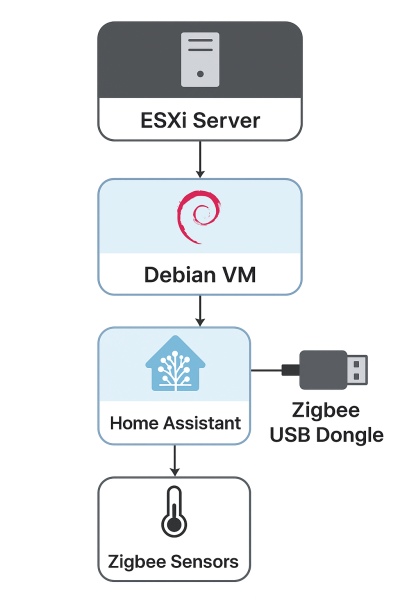
- Access in browser: http:<VM-IP>:8123 * Go through the onboarding wizard. ==== Set up Zigbee integration in Home Assistant ==== * Install Zigbee integration * Use Zigbee2MQTT or ZHA (Zigbee Home Automation) add-on: * ZHA: Easiest, built into Home Assistant. * Go to Settings > Devices & Services > Add Integration > Zigbee Home Automation * Select your USB device (/dev/ttyUSB0). * Zigbee2MQTT: More flexible if you already use MQTT. * Zigbee2MQTT on Debian VM<code>git clone https://github.com/Koenkk/zigbee2mqtt.git cd zigbee2mqtt npm ci cp configuration.yaml.example configuration.yaml nano configuration.yaml # set your serial port npm start</code> * Pair your sensors * Follow pairing instructions of your Zigbee sensor. * Once paired, Home Assistant should automatically detect temperature readings. ==== Automate and visualize ==== * Create a Lovelace card for temperature readings. * Set automations to trigger events (e.g., if temp > 28°C, turn on a fan). ==== Optional enhancements ==== * Use Docker Compose for Home Assistant and Zigbee2MQTT if you want better control. * Back up the Home Assistant VM regularly (snapshots on ESXi). * Consider a dedicated Zigbee coordinator like CC2531, CC2652, or ConBee II for best reliability. ==== Diagram ====
 ===== meer info =====
* Onboarding wizard
* Home Assistant homepage
* Docker installatie
===== meer info =====
* Onboarding wizard
* Home Assistant homepage
* Docker installatie

home_assistant/installatie.1760359999.txt.gz · Last modified: by admin